






A practical guide to cleaning, linking and consolidating records across private and public sector systems without a shared identifier using WinPure Clean&Match Enterprise™
Key Takeaways
- Organisations often hold related customer, supplier or operational data across multiple systems, without one reliable identifier connecting them.
- Incomplete, inconsistent or conflicting details make it difficult to determine which records represent the same entity without introducing false matches.
- Differences in field coverage, spelling, formatting and source reliability increase both missed matches and false matches when matching logic is applied without regard to the source or service context.
- How WinPure combines traditional matching and AI-assisted matching to match records across source systems, keeping sensitive data within the organisation’s environment
Organisations across the public and private sectors face a critical challenge with cross system data matching: preparing and consolidating large volumes of sensitive people, customer or administrative data from multiple internal and external sources into a single source of truth when no reliable identifier ties those records together. The same person or customer may have multiple addresses or surnames, recorded differently in different systems.
When records need to be consolidated for a downstream project, such as a health department’s national level health analysis, or implementing a bank’s KYC checks, the biggest bottleneck is often the quality of the data: messy, incomplete, inconsistent, siloed and duplicated.
Our data quality team has worked with multiple government departments and private sector organisations to match records across source systems without a shared identifier guiding or linking records. What we have found is that the real challenge is not simply consolidating identities once.
It is managing the entire process at scale: cleaning and preparing data, making reliable match decisions, retaining those decisions, and repeating the process as new files arrive from multiple sources. Those incoming records may already relate to people, customers, cases or properties that have been resolved before, but appear under different details or source identifiers.
Without a persistent way to recognise an already resolved person, customer, case or property, each new data refresh can reopen previous matching decisions and allow duplicate records back into the source of truth. This is why record linkage across both public and private sector systems needs to move beyond one time matching towards a process that can preserve match groups, consolidate the right values and recognise the same entity across future sources.
Definition
Why shared identifiers are often unavailable
Across both sectors, data is collected by separate teams and systems for different operational, regulatory and commercial purposes, so identifiers are usually created for the platform that issued them. When records are shared between departments or acquired businesses, privacy, data minimisation and governance requirements (such as UK’s GDPR rules) can also limit which personal identifiers are available. This means teams often need to link records using the attributes already available to them, most commonly names, dates of birth, phone numbers, addresses and account or service details.
This article helps organisations use WinPure’s data matching capabilities to link sensitive records where no shared identifier exists, while managing the wider preparation work that makes record linkage reliable at scale.
Rather than assembling separate scripts or using additional tools and resources, WinPure customers simply plug in their data into our system (that is deployed in their local environment) prepare and standardise data, perform complex matching, and create golden master records that can safely be updated into their source of truth systems. No data security challenges, no complex integrations, no unnecessary drama.
But before we take on the matching process, we need to talk about the ‘quality of data.’
Data Quality Is the Starting Point for Matching Records Successfully Across Systems
While the lack of a unique identifier is a central record linkage challenge, we have seen how poor data quality prevents organisations from successfully linking records. We’ve also seen how sometimes, teams attempt to match records on a needs-basis without cleaning the data. In fact, data cleaning and transformation is often treated as a separate technical exercise from the matching process. In practice, the two cannot be disconnected – as also supported by recent research.
Most of this data contains spelling variations, formatting inconsistencies, incomplete values and duplicated records caused by system errors, manual entry and changes to a person’s circumstances. An identifier that exists in the source of truth may be missing from an incoming file, entered differently or unavailable to the service sharing the data. Research on multi-file record linkage describes merging records about overlapping entities as “challenging in the absence of unique identifiers,” particularly where the individual source files also contain duplicates ( Aleshin Guendel and Sadinle, 2021).
Resolving this data requires more than cross-source matching – the records must be cleansed, transformed, and deduplicated before they can be matched and linked.
Once the final records are created, they need to be matched against the organisation’s source of truth, so that duplicate records are not carried into the master dataset.
In other projects, several sources may need to be compared without any one of them acting as the complete statement of truth, requiring the organisation to assess names, dates of birth, addresses, contact details and service information together. In the absence of a golden record identifier, duplicate records can re-enter an existing system without a consistent way to track the association. The problem then compounds with every new source or data refresh, making it harder to maintain a consolidated view over time.

To address this record linkage problem, WinPure has a dedicated Golden ID™ function that assigns a persistent identifier to each resolved match group. Once records have been matched and consolidated, the Golden ID can be retained and used to recognise the same entity in future incoming datasets, even where the original source identifiers differ or are unavailable.
Create a persistent reference for every resolved record
See how WinPure Golden ID™ assigns a consistent identifier to matched record groups, helping teams recognise and consolidate the same people or cases across future data sources.
Note for teams that prefer to match before cleansing
Matching first can be useful when teams want to understand the scale and type of variation in their incoming data, or when they need to test how well their existing rules perform against raw records, however, if the ultimate goal is a clean, deduped data set, then it’s always recommended to clean and prepare the data before a match run.
While both traditional fuzzy data matching and AI assisted matching can surface likely links despite spelling and formatting differences, but results become unreliable when basic standardisation is missing or applied without understanding the source data. For example, 03/04/1976 can mean 3 April in one dataset and 4 March in another. If the date format is interpreted incorrectly before matching, records relating to different people can appear to agree on a key attribute and be assigned an unjustifiably high match score. The consequence of this can be drastic, especially if the outcome is saved as master records to be used in downstream projects.
This approach of cleaning before matching is supported by multiple research bodies. A highly popular research paper on linking address data across Australian government agencies found that record linkage becomes particularly difficult when source data has significant quality issues, and identified standardising raw data before linking as the most common response. The researchers also caution that poor standardisation can create its own errors (Zhang, Churchill and Ng, 2017) as demonstrated in the example above. The lesson therefore, is simple: clean with a clear understanding of each source, customise standardisation and governance rules, be thorough with your records, before you attempt to link them.
Definition
What does record linkage at scale really mean?
Record linkage refers to the process of consolidating records across different datasets that relate to the same person, organisation, household or case, even when no shared identifier exists. At scale, it involves key processes like data preparation, matching, review and persistent identity decisions across large and recurring data sources.
Data Preparation for Record Linkage: How to Clean & Standardise Data Without Coding
While in-house scripts and codes can give teams a sense of control, they also create a growing operational burden (especially since data is accumulated at a much faster pace these days than ever before!), where engineers have to spend time iterating scripts, building workflows, and testing more queries or plugins to resolve increasingly complex data quality challenges. Thought building scripts may seem like the job of an engineer, we firmly believe, they are meant to do much more meaningful work than simply cleaning the dates off a list – tasks that are rudimentary and can easily be done with a no-code data cleansing tool.
Moreover, the effort is not limited to cleaning one project – it’s an on-going job. Teams may need to regularly test different parsing rules, refine refine standardisation logic, tune matching algorithms, validate thresholds – amongst many other tasks. It is not feasible to do this at scale, especially when millions of records have complex identity challenges. If a data engineer spends a majority of their time (industry estimates, it’s nearly 80%) in data cleaning tasks, there is less capacity for analytical and modeling work that genuinely require their expertise.
That’s the problem WinPure is solving with its Clean&Match Enterprise™, a no-code platform that can profile and clean millions of rows of data in seconds, with just one click.
The WinPure platform gives teams a more sustainable way to manage recurring data cleaning work. Instead of combining SQL queries, scripts, plug ins, spreadsheets and separate matching tools, users can profile data, configure cleansing rules, test matching methods, review results and save approved processes in one project. The rules remain visible and reusable, allowing data stewards and analysts to manage routine preparation work while data engineers retain their time for bespoke requirements without having to worry about cleaning a list.
Here’s a quick walkthrough of five-step process:
1. Import data with built-in connectors
Identify missing values, inconsistent formats and patterns affecting fields used for matching.

2. Profile the incoming data and validate data scores
Identify missing values, inconsistent formats and patterns affecting fields used for matching.

3. Clean with AI or with manual selection
Assign the correct data type to each column, such as person name, company, address, city or postal code, using AI assisted detection or manual mapping.

4. Build your own pattern & word manager
Validate the transformed records before duplicate detection and cross source matching.

5. Review live transformation
See how each rule changes the data in real time, allowing teams to validate and refine transformations before applying them across the full dataset.

With WinPure Clean&Match Enterprise™, this preparation work takes place entirely within the organisation’s own environment, with no cloud calls and no need to move sensitive customer, citizen or administrative records to a third party platform. Teams retain control over their source files, cleansing rules, review decisions and outputs, while avoiding the ongoing burden of developing, tuning and maintaining separate algorithms for routine data quality work. The result is a secure, repeatable and auditable foundation for the matching process.

And now that the data is clean, matching without identifiers becomes less of a challenge. Trust the process!
Matching Customer, People, & Administrative Data Across Multiple Sources
Once records have passed the quality score, the next step is deciding on the matching process. Here, the decision depends on context:
—> Linking several datasets where no dataset is authoritative – a many to many match with the preferred outcome being a consolidated group of master records.
—> Matching incoming data against an established master source – an incoming source to master source with the preferred outcome being linking new records or updating them into an existing master record.

These are different matching tasks, requiring different configurations, acceptance thresholds and review paths.
The matching fields may be similar in both cases, such as names, dates of birth, addresses and phone numbers. What changes is the purpose of the match and what happens to the records afterwards.
A health department, for example, may link hospital, primary care, local authority and social care records for national analysis. No source necessarily holds the full picture, so the aim is to identify records that relate to the same person or household and create a consolidated match group. In this case, the multi-source data linkage configuration would involve deciding on which field combinations provide enough evidence to create a match group, which algorithms is best suited for the match group (for example phonetic matching is best for international names, fuzzy matching for string differences and so on), and which matched groups gets a new identifier or golden ID.
The same department may also receive a new extract that needs to be added to its SQL Server source of truth. Here, the aim is to identify records that already exist in the master dataset, identify duplicates within the new file, and prevent incorrect or repeated information from being carried into the existing system.
Records with strong evidence of a match can be linked to the master record, while uncertain matches remain available for review. In this case, the process first involves deduplicating the incoming file, then comparing the remaining records with the source of truth. The department can decide what should happen to each outcome: whether to update an existing master record, create a new record, or hold the result for human review. They also need rules for which values can update the master record, rather than allowing an incoming value to replace an existing one simply because the records matched.
Best Practice
Keep cross source linkage and master data updates in separate matching projects. A configuration designed to identify related records across several sources will usually return broader match groups for consolidation and review. WinPure project settings allow organisations to retain separate source mappings, matching rules, thresholds and outputs for each operation, which helps users manage both aspects of a match operation without losing focus.
In terms of the matching logic itself, WinPure supports record linkage across public and private sector organisations with two complementary approaches to data matching: traditional match algorithms and AI assisted matching.
More on the matching choices here:
Configure traditional matching around the evidence available
Traditional matching gives analysts direct control over the logic used to identify records. They can define the rules, the matching algorithm, and the threshold or weight assigned to each component. WinPure supports exact, fuzzy and phonetic matching methods within this rules based process. Jaro Winkler and Levenshtein Distance help users account for spelling differences, abbreviations and transposed characters in names, addresses and other text fields. Phonetic matching can identify name variations that sound alike but are written differently. These methods allow organisations to define matching criteria that are appropriate to the source, rather than treating every variation as either an exact match or an unmatched record.
Here’s an example:
A department may begin with an exact comparison on a trusted case number or standardised postcode. Where that identifier is unavailable, it can use a combination of name, date of birth, address and phone number to establish whether two records are likely to relate to the same person. The choice of fields determines the quality of the match outcome: A precise date of birth may carry more weight than a common surname, while a close name and address match may need further confirmation before it creates a match group. A combination of exact, numeric, fuzzy and phonetic matching can be used to identify matches based on the type of field.
This is particularly useful where the same department receives several recurring datasets with different levels of completeness. One source may provide a full name, address and date of birth. Another may only include an abbreviated name, partial address and service information. WinPure allows the matching criteria to reflect those differences, so that the organisation can apply a reliable combination of evidence for each source relationship.
Apply matching rules in the right order
The order in which matching rules run affects both the result and the review workload. A high confidence rule should not be mixed indiscriminately with a broad rule designed to find possible links.
WinPure offers two rule flow options.
1). Direct Flow processes records through the first rule created, sets aside the records that match, then passes the unresolved records to the next rule. This gives teams a clear way to resolve the strongest matches first. For example, they may start with an exact identifier or a strict combination of name, date of birth and address, then apply more tolerant matching logic only to the records that remain unresolved.
2). Mixed Flow applies all configured rules across the data. This can be useful when analysts need to test alternative matching criteria, compare the groups each rule produces and understand where the same records are being identified through different combinations of evidence. It is particularly valuable during configuration, when a department needs to assess the impact of a broader algorithm or lower acceptance level before applying it in a recurring process.
Both flows support a more controlled review process. High confidence matches can proceed to consolidation, while lower confidence groups can remain separate for investigation, enabling teams to avoid treating a possible similarity as a confirmed match simply because a broad rule returned it.
Use MatchAI™ to Surface Complex Record Relationships
Traditional matching in WinPure gives analysts granular control over how the engine compares each field. They can select exact, fuzzy or phonetic methods, set the threshold each condition must meet, and specify which attributes must be combined for a match to surface. This is highly valuable when field reliability is understood and analysts need to review matches at a detailed level, with clear evidence behind every grouping. However, traditional matching lacks in certain key areas: for one, it does not provided a holistic view of the data.
When matching records without a shared identifier, companies need a wider view where a match is not at an individual level, but at a more relative level such as in the case of family or household data, where overlapping names, addresses, and contact details, mistaken as duplicates could simply be members of the same family. A person may also appear under a previous surname, an abbreviated name or an older address that could possibly indicate their marital status which may be different to what the record originally holds. Looking at any one field in isolation can either miss the connection or group records that should remain separate.
MatchAI™, WinPure’s AI-assisted data matching engine, is a secure, localised technology that can be used to look at records holistically. It uses the evidence available across names, addresses, contact details and other attributes to surface likely duplicates and related record patterns that merit review. This is particularly useful where the variation is spread across the record, such as a transposed name and address, nickname variation or culturally different name formats.
The Difference Between Fuzzy Matching and MatchAI™
The example below shows why the two approaches can produce different results from the same records. Traditional fuzzy matching evaluates the specific columns and rules selected by the analyst. MatchAI™ considers the evidence across the complete record, which can surface likely duplicates when data has been entered inconsistently across fields.

The illustration shows how the same records can produce different outcomes. Traditional fuzzy matching compares the fields selected in its configuration, usually first name with first name, surname with surname and address with address. Where values have been entered in the wrong columns, a nickname has replaced a formal name, or an address is structured differently, those individual comparisons may not reach the required threshold. MatchAI™ assesses the record as a complete identity pattern. In this example, it can recognise that the name values, date of birth and address information still point to the same person, even though they no longer appear in the expected fields or formats. It brings the records forward as a likely match for review, allowing teamsto decide whether to consolidate them, purge them, or store them as another list for later review.
Best Practice
MatchAI™ does not replace the need for configurable matching rules. It complements them. Teams can use conventional matching where they need defined and auditable field level criteria, then use MatchAI™ to bring forward complex candidate groups that would be difficult to capture through a long list of exceptions. This gives analysts a fuller view of the records that may be connected, while retaining control over the final decision to group, separate or consolidate them.
A Step-by-Step Data Matching and Linking in WinPure: From Messy Duplicates to Creating Master Records and Golden IDs.
Selecting a matching method is only one part of the record linkage process. Teams also need to decide how sources will be compared, how much evidence is required before records enter the same match group, who reviews uncertain results and how a confirmed identity is retained when the next data delivery arrives.
WinPure Clean&Match Enterprise™ brings these decisions into one controlled workflow, where teams can use configured traditional rules if they need field level control or apply MatchAI™ to surface more complex identity patterns, review the results before consolidation, and retain a persistent identifier for the resolved person or case. The workflow is relatively simple:
1. Create the matching project for the source relationship, whether several sources are being linked or an incoming file is being compared with a master dataset.

2. Configure traditional match rules where the organisation needs explicit control over fields, algorithms and thresholds.

3. Run MatchAI™ alongside the rules where the data contains cross field variation, nicknames, reordered values or household relationships that require a wider identity view.
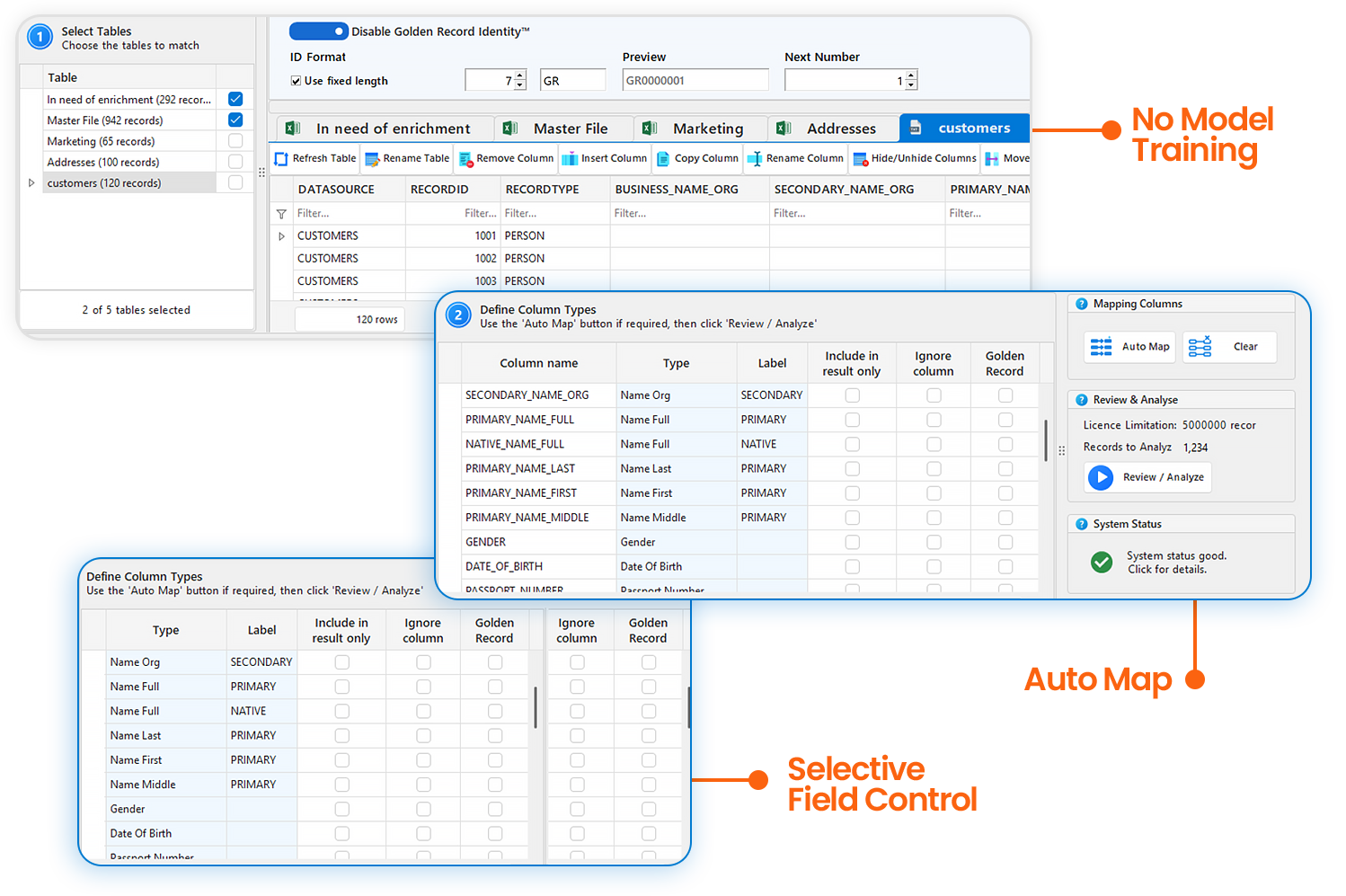
4. Review match groups and confidence results before any records are consolidated or added to the source of truth.
5. Select the master record and assign Golden ID™ so the resolved entity can be retained and recognised in future deliveries.
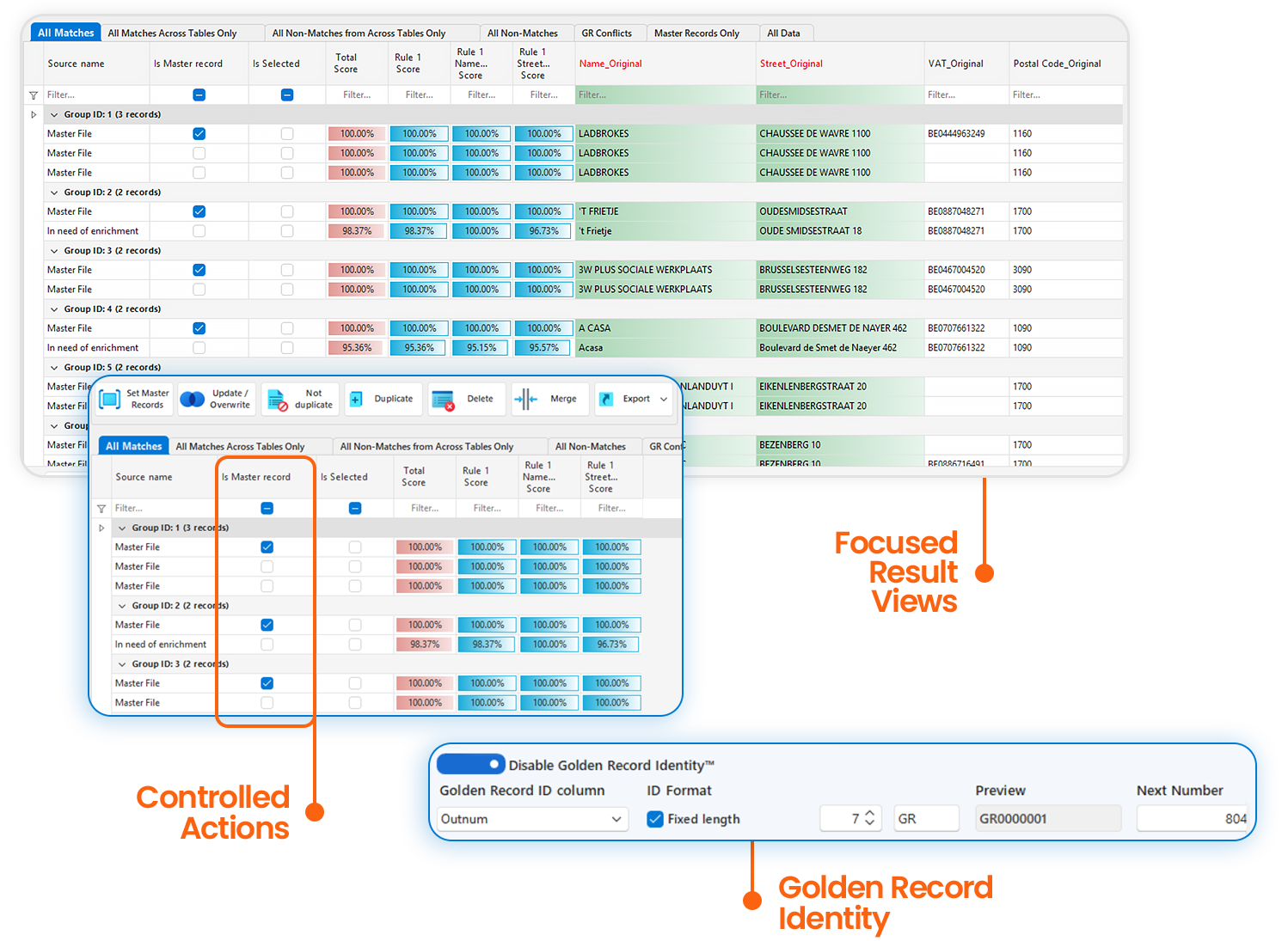
Teams can create multiple match projects to match records across source systems, where each project keeps its source relationship, cleaning rules, matching criteria and review process together, so analysts do not need to rebuild the logic every time a department supplies another extract.
Once match groups are confirmed, a user can define the master record selection criteria using SmartMaster AI™, WinPure’s AI assisted capability for identifying the most complete and reliable record within each matched group, and assign a Golden ID™ to the resolved person or case. Future files can then be checked against that persistent identity, helping the agency recognise records it has already linked and preventing previously resolved duplicates from reappearing as new records.
Tying it all together: How WinPure Supports End to End Data Preparation and Matching for Record Linkage
As we’ve already established, data preparation is fundamental to successful record linkage, yet many organisations manage it through disconnected spreadsheets, SQL scripts, plug-ins and separate matching tools, making it much harder to actually link records while retaining a clear audit trail – also – the struggle with automating and building a repeatable process gets much more difficult when there are so many other factors involved.

WinPure Clean&Match Enterprise™ brings this work into one on premise platform. It gives organisations one secure, locally-deployed environment to understand, prepare, resolve and retain the value of their data at scale. Here’s how we support the record linkage process:
1. Work from a secure copy of the source data
WinPure imports a working copy of source data for profiling, cleansing and matching. The original source remains unchanged while analysts assess results, refine rules and determine the correct output. This provides a safer environment for work involving patient, resident, household or administrative records.
2. Prepare the fields that drive the match
Data Quality Insights, CleanMatrix™ and CleanAI™ help teams identify and address the inconsistencies that reduce match confidence. They can standardise date formats, names, addresses and contact information, then retain approved rules for recurring source files. The aim is to make the data more comparable before matching begins, without losing the original values or their provenance.
3. Configure traditional matching around the source relationship
WinPure supports exact, fuzzy, phonetic and numeric matching, including Jaro Winkler and Levenshtein Distance. Analysts decide which fields to compare, how much weight each should carry and the threshold required to create a match group. This level of control is useful when a team needs transparent, field level logic for a particular operation, such as comparing an incoming extract with an established master dataset.
4. Use MatchAI™ to identify complex identity patterns
MatchAI™ adds a holistic view of records where the evidence does not sit neatly in the expected columns. It can surface likely duplicates where names have been entered in the wrong fields, nicknames replace formal names, dates use different recognised formats or address components appear in a different order. It can also identify household and family relationship patterns that may be relevant to public sector analysis. Teams retain control over whether those records should be grouped, kept separate or reviewed further.
5. Review match groups before consolidation
A match should lead to an informed decision. With a Match Explanation™ technology, WinPure allows analysts to inspect the grouped records, the scores and the evidence that created the result with explainable results – meaning users can see which records matched and why.
6. Create a reliable master record
Once an agency confirms a match group, it needs to determine which version of the record should represent the best available view. SmartMaster AI™ can assess matched records for completeness, consistency and reliability, then identify the strongest candidate for the master record. Users however, can choose to create or retain their own master record rules where they need explicit control over which source values take precedence.
7. Retain the identity decision across future data deliveries
Finally, a Golden ID™ feature assigns a persistent identifier to each resolved entity group, allowing teams to recognise the same person, case or property when a later source file arrives with a different local reference number or revised attributes, effectively reducing the risk of previously resolved duplicates returning as new records.
8. Automate the process and keep it auditable
WinPure stores source mappings, preparation rules, matching configurations and output settings within project files. Users can choose to build and keep separate configurations for different data operations, rerun an approved process for recurring deliveries and use Windows Automation for scheduled jobs. Audit functionality can record changes made during cleansing, matching and consolidation, supporting internal governance and review.
All of this, in one easy to use, modular platform.
Customer Quote
It’s a great tool. We were able to find some data issues that would have taken a lot of time if we had done them manually. I’m very happy with its speed and easy to use navigation, It’s a very good experience.
Desikan Narasimhan, IT Chief Architect
Wrapping it Up: An Evaluation Checklist for Data Preparation & Linkage at Scale
It’s important to acknowedge that when records need to be consolidated at scale (millions of records across multiple internal and external data sources), it involves a lot more than just using a matching tool. It is a process that begins with understanding the source data, continues through cleaning and controlled identity resolution, and ends with a reusable, governed master view. A product that only returns likely matches can leave teams to manage the surrounding work through separate scripts, spreadsheets and manual review which beats the purpose of building accurate and reliable records.
When evaluating a platform, look for one that takes the team through the entire process: from incoming data to defensible match decisions, consolidated records and future deliveries. The questions below help distinguish a matching product from a platform built for ongoing data operations.
- Can it profile and prepare data before matching begins?
- Can it connect to SQL Server, CRMs, or other databases?
- Can cleansing and standardisation rules be saved and reused?
- Can users configure fields, algorithms, thresholds and match flow?
- Can it combine traditional matching with AI assisted entity resolution?
- Can users review match evidence and separate confirmed matches from candidates?
- Can it create master records and retain persistent identifiers?
- Can approved configurations and match decisions be reused for new data deliveries?
- Can recurring jobs be automated with a clear audit trail?
- Can sensitive data remain inside the organisation’s own environment?
The more of these capabilities a platform brings together, the less work your team would have to juggle.
Start a free 30 day trial of WinPure Clean&Match Enterprise™ and see how you can prepare, match and consolidate complex data within your own environment.
Try WinPure free for 30 days.
Frequently Asked Questions When Matching Records at Scale
Use a combination of available attributes, such as name, date of birth, address, phone number and gender. The matching rules should reflect the reliability of each field and return a score or confidence level that supports review. This approach is commonly described as record linkage or data linkage.
Yes. A source with reliable identifiers may use strict deterministic rules, while another may require fuzzy matching across demographic attributes. Separate project configurations help keep the rules, thresholds, cleansing logic and output specific to each source relationship.
Exact matching requires the selected values to agree exactly after any approved standardisation. Fuzzy matching measures similarity between values that can contain spelling, formatting or phonetic variation. Probabilistic matching uses the combined evidence from several fields to estimate the likelihood that records refer to the same entity. The appropriate method depends on the source data and the required confidence level.
Start with the strongest available evidence, keep strict and tolerant rules separate, and review representative results before applying a configuration more broadly. Match scores, output statistics and record level inspection help identify rules that are accepting weak candidates or missing valid matches.
Treat the master record decision separately from the match decision. Define a clear selection rule using the information available, such as completeness, recency or an approved business criterion. Keep that logic visible so users can see why a record was selected to represent the group.
Once a configuration has been tested and approved, WinPure Windows Automation can run the project file as a scheduled batch process. The process can apply the chosen cleaning matrix, matching rules and master record settings, then send results to the required output location.
Yes. WinPure Clean & Match Enterprise runs entirely locally on your environment and can be deployed on the cloud, your server or your desktop, so matching and recurring processing take place within the organisation’s own environment.
Share this article


